


Light up your screen with the OSR Starsaver
Have you ever wanted to turn your named star into a beautiful wallpaper for your phone or computer? With the OSR Starsaver, you can instantly create a personalized star wallpaper and carry your star with you everywhere you go.
The OSR Starsaver transforms your registered star into a stunning custom galaxy wallpaper that works perfectly as a lock screen, home screen, desktop background, or aesthetic space wallpaper. Simply open your personalized Starsaver, take a screenshot on any device, and set it as your background within seconds.
No downloads. No waiting. No complicated setup.
Whether you are looking for a custom star wallpaper, a personalized lock screen, or a unique galaxy background featuring your own named star, the OSR Starsaver makes it easier than ever to light up your screen.
What is the OSR Starsaver?
The OSR Starsaver is a personalized star wallpaper creator and is available to everyone who has named a star in the Online Star Register.
The OSR Starsaver transforms your named star into a beautiful personalized background featuring your chosen star name. This allows you to create your own custom wallpaper using your personal star registration.
Unlike traditional downloadable wallpapers, the OSR Starsaver works instantly on any device. Open your personalized Starsaver, and take a screenshot to create your own:
- Personalized wallpaper
- Star lock screen
- Custom phone background
- Galaxy desktop wallpaper
- Aesthetic screensaver
Because the OSR Starsaver works directly from your account, you can create a new wallpaper or background anytime you want.
Why the OSR Starsaver feels so personal
The OSR Starsaver is one of the easiest and most personal ways to enjoy your named star every single day.
Instead of keeping your star registration stored away, you can turn it into something you see constantly on your:
- Smartphone
- Tablet
- Laptop
- Desktop computer
Your personalized star wallpaper becomes a daily reminder of a special memory, loved one, anniversary, birthday, or meaningful moment.
How do I get access to the OSR Starsaver?
Creating your personalized wallpaper only takes a few simple steps.
Step 1: Log in to your OSR Account
Use the login details from your confirmation email to access your Online Star Register account.
Step 2: Open the Starsaver View
Inside your account, open your personalized OSR Starsaver.
Step 3: Take a screenshot
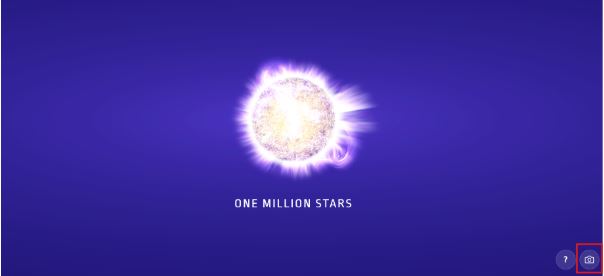
Simply open your personalized star scene and capture your favorite view with a single click on the camera icon.
Step 4: Set your OSR Starsaver as your wallpaper
Within moments, your named star becomes part of your everyday life.
Use your screenshot as:
- Home screen
- Lock screen
- Desktop wallpaper
- Tablet background
- Screensaver
On iPhone
- Open your screenshot in the Files app.
- Tap the Share button.
- Select Save Image.
- Open the image in the Photos app.
- Tap the Share button again.
- Select Use as Wallpaper.
- Adjust the image if desired.
- Set it as your Lock Screen, Home Screen, or both.
On Android
- After downloading the screenshot, tap Open.
- Tap the Share button to save the image.
- Open your Gallery app.
- Tap the menu icon.
- Select Set as wallpaper.
- Choose the screen you would like to use.
On Mac
- Save your screenshot.
- Open System Settings.
- Go to Wallpaper.
- Select your OSR Starsaver image.
On Windows
- Open the image from your Downloads folder.
- Right-click the image.
- Select Set as.
- Choose Desktop background or Lock screen.
Create different wallpapers for every device
With the OSR Starsaver, you can create personalized wallpapers for all your favorite devices. Whether you want a unique lock screen for your phone, a beautiful galaxy wallpaper for your laptop, or a matching background across all your screens, the OSR Starsaver makes it easy.
Because the Starsaver View works perfectly on any screen size, you can quickly create custom wallpapers that fit your device beautifully.
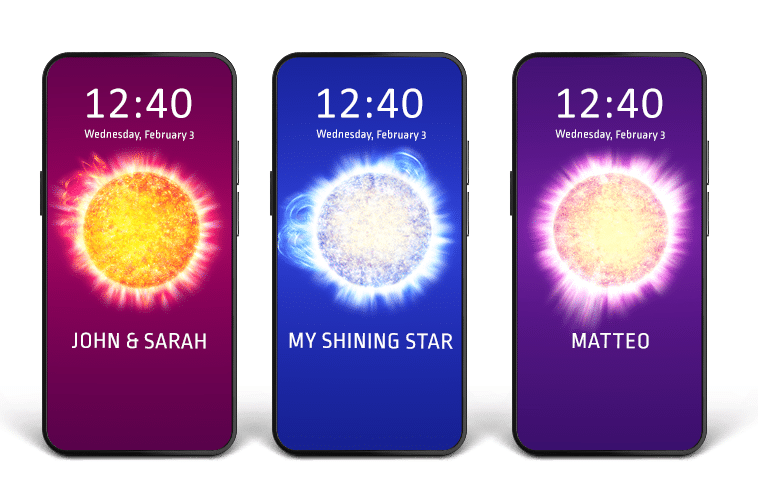
The OSR Starsaver is also perfect for sharing with friends and family.
After creating your personalized wallpaper, you can instantly share screenshots through:
- TikTok
- Messages
If you gifted a star to someone special, they can also create their own personalized wallpaper featuring their named star.
This makes the OSR Starsaver a beautiful addition to any star gift experience.
Helpful tips for the OSR Starsaver
Where can I find my OSR Starsaver?
Log in to your OSR account and open the Starsaver View in your account area. There you will find your personal star view.
How do I take a screenshot of my OSR Starsaver?
Log in to your OSR account, open your personal star view, and simply take a screenshot on your phone, tablet, or computer.
How do I save my star background?
Click the camera icon to easily save your star background to your device.
My star is not loading. What can I do?
Please stay on the page while your star is loading. If it takes longer than expected, refresh the page and try again.
Can I use the OSR Starsaver on multiple devices?
Yes, the OSR Starsaver works on phones, tablets, laptops, and desktops. This allows you to use your star background anywhere you like.
Turn your named star into something you see every day
Your named star deserves more than just a certificate. With the OSR Starsaver, you can transform your registration into a personalized star wallpaper that stays with you everywhere you go.
Whether you want a custom galaxy wallpaper, a romantic lock screen, an aesthetic space background, or a personalized phone wallpaper, the OSR Starsaver helps you create something truly unique in seconds.
Open your OSR Starsaver today and turn your named star into a personalized wallpaper you can enjoy everywhere you go.
Create your own Star wallpaper!
Don’t have your own star yet? Register a star and create a personalized wallpaper you can carry with you every day.